- SNMP OPC Server - runtime application
- SNMP OPC Server - Configurator
Except of this, links to documentation and installation packages are copied and added to the start menu of the application. From that, they can be installed in next steps. Some of them have then own folder of the highest level in the start menu (see items SAEAUT SNMP OPC WebView and SAEAUT UA Data Access Client in the Figure bellow). From the start menu can be opened also OPC client example projects for MS Visual Studio.
Within the first installation step, are copied also:
- example configurations to the folder x:\Users\user\Documents\SAEAUT SNMP OPC Server\Configurations\
- example MIB files to the folder x:\Program Files\SAEAUT SNMP OPC Server\mibs\
- example MIB files to the folder x:\Program Files\SAEAUT SNMP OPC Server\CSV
Within the first installation step, directory for log files Within the first installation x:\Users\user\Documents\SAEAUT_SNMP_OPC_Server\Log is created. Contrary to other directories, this folder is not removed by uninstall process.
SAEAUT SNMP OPC Server™ is often used for monitoring and control of uninterruptible power sources - UPS. Therefore it is delivered with example configuration SNMPConf UPS-MIB rfc1628.mdb where MIB variables according to the rfc1628.mib are mapped to the OPC server address space.
Some OPC functionality related dll's e.g. OPCDAAuto.dll and components e.g. OPC Enum are installed to System32 folder. There are also dll's ReleaseTrace.dll and TraceWorX.dll that belong to the module TraceWorX from ICONICS, Inc.
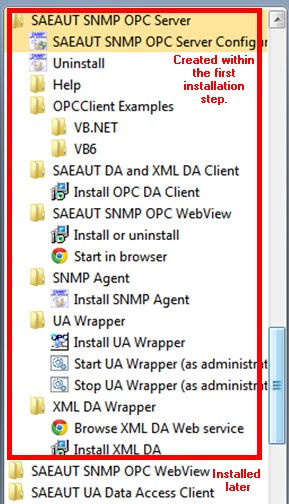
Figure: Start menu for SAEAUT SNMP OPC Server™
Next applications can be installed from folders of the SAEAUT SNMP OPC Server start menu (figure above):
- SAEAUT DA and XML DA client to learn OPC DA and OPC XML DA functionality
- SAEAUT SNMP OPC WebView - to access of the OPC DA address space from a web browser
- SNMP Agent - to learn working with SNMP agents on managed devices
- UA Wrapper - by instalation of that also SAEAUT UA Data Access Client and UA configuration tool (see in Start menu in OPC Foundation folder) are installed.
- XML DA Wrapper - to use HTTP SOAP communication
Send feedback on this topic.
Copyright © 2004-2013, SAE - Automation, s.r.o. (Ltd.), All rights reserved.